Understanding Your Character Sheet
Last updated Nov 2, 2026
Character Sheet Layout
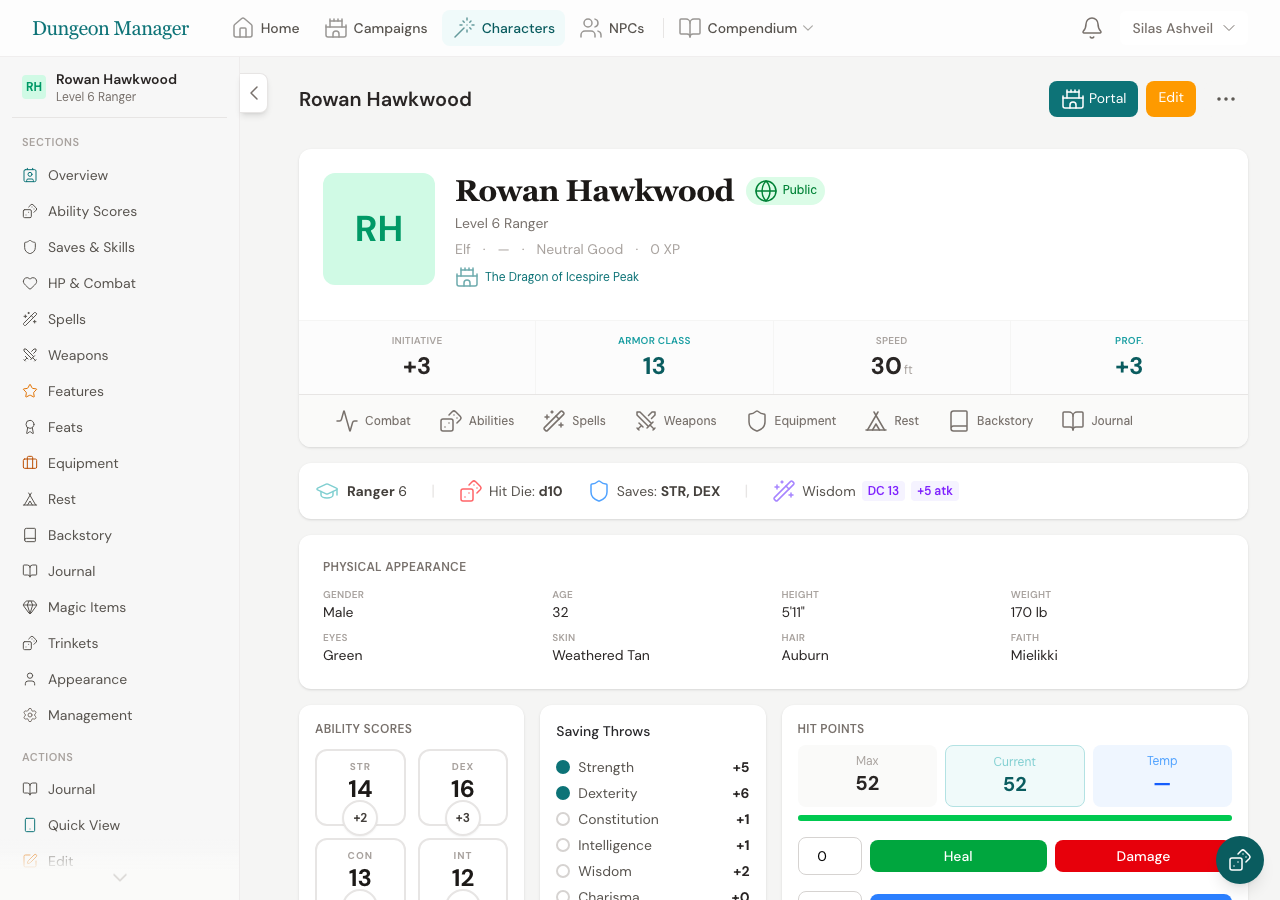 A complete character sheet for a Level 3 Fighter — all sections are visible and interactive.
Your character sheet is organized into clear sections. Here's what you'll find:
Header Card
At the top of the sheet you'll see your character's portrait (or initial), name, level, class, species, background, alignment, XP, and a clickable Currency pill showing your active coin balances (clicking it jumps straight to Equipment & Currency and opens the currency editor). If your character is assigned to a campaign, the campaign name appears as a link.
The combat stats row shows your four key numbers, all automatically calculated from your class, species, subclass, feats, and equipped items:
- Initiative — your bonus to initiative rolls (DEX modifier plus automatic bonuses from features like the Alert feat, Gloom Stalker's Dread Ambusher, Champion's Remarkable Athlete, or Bard's Jack of All Trades)
- Armor Class — how hard you are to hit, factoring in equipped armor, shields, Unarmored Defense (Monk
10 + DEX + WIS, Barbarian10 + DEX + CON, College of Dance Bard10 + DEX + CHA), Draconic Resilience (13 + DEX), species Natural Armor (Tortle17, Lizardfolk13 + DEX), Defense fighting style (+1in armor), and Medium Armor Master - Speed — how far you can move per turn (in feet), including species speed (such as Wood Elf
35 ft.), Monk Unarmored Movement, Barbarian Fast Movement, Ranger Roving, Oath of Glory Aura of Alacrity, and speed feats (Mobile, Speedy, Boon of Speed) - Proficiency Bonus — added to attacks, saves, and skills you're proficient in
Ability Scores
Six ability score boxes showing your score and modifier for STR, DEX, CON, INT, WIS, and CHA. The modifier (the number in the circle below) is what you actually add to rolls.
Saving Throws & Skills
- Saving Throws — your bonus for each of the six saves, including automatic bonuses from Paladin's Aura of Protection (Level 6+), Monk's Disciplined Survivor (Level 14+), Rogue's Slippery Mind, Gloom Stalker's Iron Mind, and the Resilient feat. Filled circles indicate proficiency. Character owners can click any saving throw circle to toggle proficiency on and off, or open the Rules & Edit modal.
- Skills — all 18 skills with their modifiers (including Bard's Jack of All Trades half-proficiency on non-proficient skills). Click any skill circle to cycle through proficiency levels: None (empty), Proficient (filled circle), and Expertise (double-ringed circle, which doubles the proficiency bonus).
- Rules & Edit Modal — click Rules & Edit to view a full breakdown of proficiencies granted by your species, background, class, and subclass, adjust individual proficiencies, or reset to 5e recommended defaults.
- Passive Scores — Passive Perception, Insight, and Investigation (10 + skill bonus, plus
+5from the Observant feat), automatically updated whenever your skill proficiencies or feats change. - Proficiencies & Training — view and edit your Armor, Weapon, Tool, and Language proficiencies inline.
HP & Combat
- HP Tracker — your current and maximum HP with damage/heal buttons (automatically factoring in Tough, Dwarven Toughness, Draconic Resilience, and Boon of Fortitude). Includes temporary HP support.
- Conditions — toggle D&D 5e conditions (Blinded, Poisoned, etc.) with tooltips explaining their effects.
- Class Resources — track uses of class features like Rage, Channel Divinity, Ki Points, etc.
Spells & Spell Slots
If you're a spellcaster, you'll see:
- Spell Slot Tracker — mark off slots as you use them, organized by level
- Spell List — all your known/prepared spells with level, school, casting time, and range
- Spell Preparation — toggle which spells are prepared for the day
XP & Level Up
Your current XP, the threshold for the next level, and a progress bar. When you have enough XP, a Level Up button appears to start the guided level-up wizard.
Weapon Attacks
A table of your weapon attacks showing name, attack bonus, damage dice, damage type, average damage, and special properties — including automatic Monk Martial Arts die scaling (1d6 to 1d12), DEX-based Monk weapon attacks, and Archery / Dueling / Unarmed Fighting fighting style bonuses.
Features & Traits
Your class features, species traits, and background features organized by action type (Bonus Actions, Reactions, Actions, Passive Features). Each feature shows its source (class, species, background, or feat).
Equipment & Currency
Manage your inventory — add/remove items, track quantities, and manage your gold, silver, copper, electrum, and platinum. Click or tap any coin card (PP, GP, EP, SP, CP) or the Edit / Add Currency button to quickly + Add or - Spend coins on the fly, use -1 / +1 steppers, or set exact coin balances. Currency can also be edited in the Equipment & Spells section of the Character Editor.
Rest & Recovery
Buttons for Short Rest (spend hit dice to heal) and Long Rest (restore all HP, spell slots, and resources). The panel shows exactly what each rest type recovers.
Journal
A preview of your most recent journal entries — private notes only you can see.
Character Management
At the bottom: transfer to a different campaign, save as a template, and the danger zone (retire or delete).
Was this article helpful?
Thanks for the feedback!